Usecase4: Merge datasets
This usecase describes how to use Brioche to map multiple datasets for merging.
This usecase is an extension of Usecase1 but with distinct defined goals and as such will only briefly touch on how to set up
Requirements
Per dataset of interest:
1. Brioche to have been run and the files below are present ‘*_Brioche_all_markers1to1stagingforvcf.csv’
‘*_marker_localdups_NULLS_counts.tsv’
‘*_priors_informed_strictmapping.tsv’
The genotype data file you have is in one of the following three forms:
Raw genotypes in the format below (tab-separated).
REF/ALTare defined as ACGT/ACGT, samples are columns, markers are rows, genotypes are coded as0,1,2,NCas missing data, andNas null alleles.Name REF ALT Sample1 Sample2 etc Marker1 T C 2 1 Marker2 T G 0 N Marker3 A C NC 1
A VCF file (any VCF-compatible format).
A DArTseq report (1-row format).
Runfile
Per dataset of interest: to reanchor genotype data onto the new reference, a .sh script has been provided in the Additional_functions/ folder Additional instructions are provided in the file but the main components to change are
The Slurm sbatch header commands e.g., #SBATCH –job-name=”example_anchoring”
the values of variable set in the section Variables to set in the script. There are 13 variables to set but most are changing the file paths and names of input/output files to the names generated in the specific brioche run
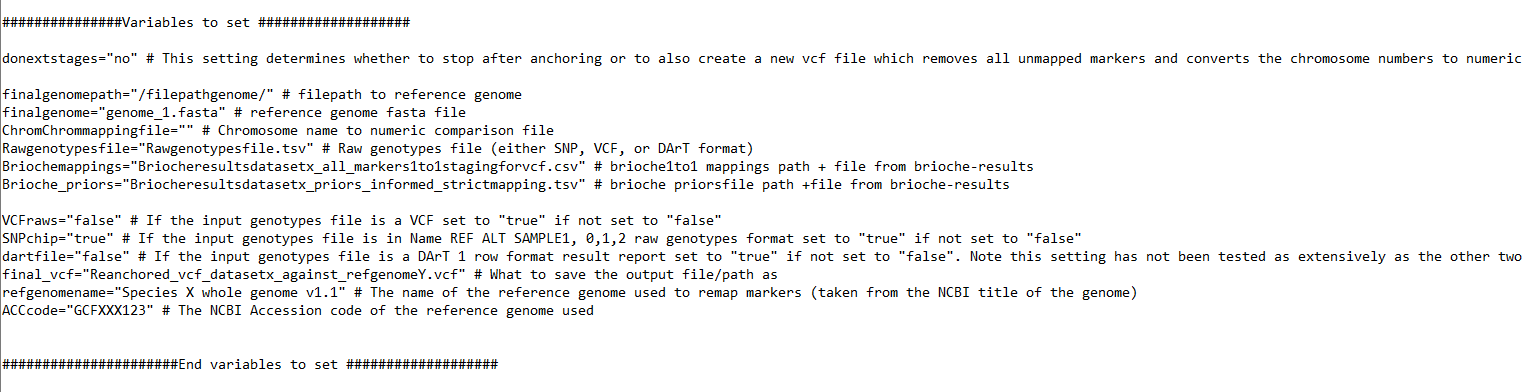
the below setting is required
donextstages="yes"
Outputs
Brioche will produce a number of outputs similar to casestudy2 Usecase2: In silico genotyping of reference genomes
These are
a VCF output with all markers
A VCF with only mapped markers
A VCF with mapped markers which have numeric chromosomes
A VCF with mapped markers which have numeric chromosomes which are sorted
For each of the analysed datasets the user can take
A VCF with mapped markers which have numeric chromosomes which are sorted
and if there is sufficient overlap in markers the user can directly merge the new datasets
e.g., through first activating the brioche-vcf conda environment and then running bcftools
‘union_two_datasets.vcf.gz’ will have all markers and all samples across both datasets
‘isec_merged_results’ will be a folder with 3 vcf files, one for unique markers in dataset1, one for unique in dataset2, and one for shared markers
conda activate brioche-vcf
gzip dataset1.vcf
gzip dataset2.vcf
bcftools index -c dataset1.vcf.gz
bcftools index -c dataset2.vcf.gz
bcftools merge \
 -m none \
 -Oz \
 -o merged_union_two_datasets.vcf.gz \
 dataset1.vcf.gz dataset2.gz
bcftools isec -p isec_merged_results -c all dataset1.vcf.gz dataset2.vcf.gz
Alternatively if there is still poor overlap each dataset can be run through imputation and the imputed datasets can be merged for greater overlap
Other usecases
If you are interested in other usecases see.
1. If you are interested in easy remapping of markers across any distinct reference genome and the reanchoring of genotypes to the new reference genome Usecase1: Remapping data across reference genomes
2. If you are interested in extracting genotype calls from one or multiple reference genomes and adding them to your population genomics study go to Usecase2: In silico genotyping of reference genomes
3. If you are interested in determining whether an existing marker dataset might be amplifying redundant regions under varied settings go to Usecase3: Testing redundancy/accuracy in marker datasets
4. If you are interested in the creation of custom marker datasets from existing analyses and testing the likely redundancy of newly designed markers against a wide range of reference genomes for a target species (similar process as 3.) go to Usecase3: Testing redundancy/accuracy in marker datasets
6. If you are interested in merging two VCF files mapped to the same reference genome and preserving the unique brioche chrUnk unmapped states go to Usecase5: Combining VCF files of different samples anchored against the same reference
otherwise, to return to the Introduction page go to Introduction
